Interactive Hologram
Team (contributor) · 2024

Overview
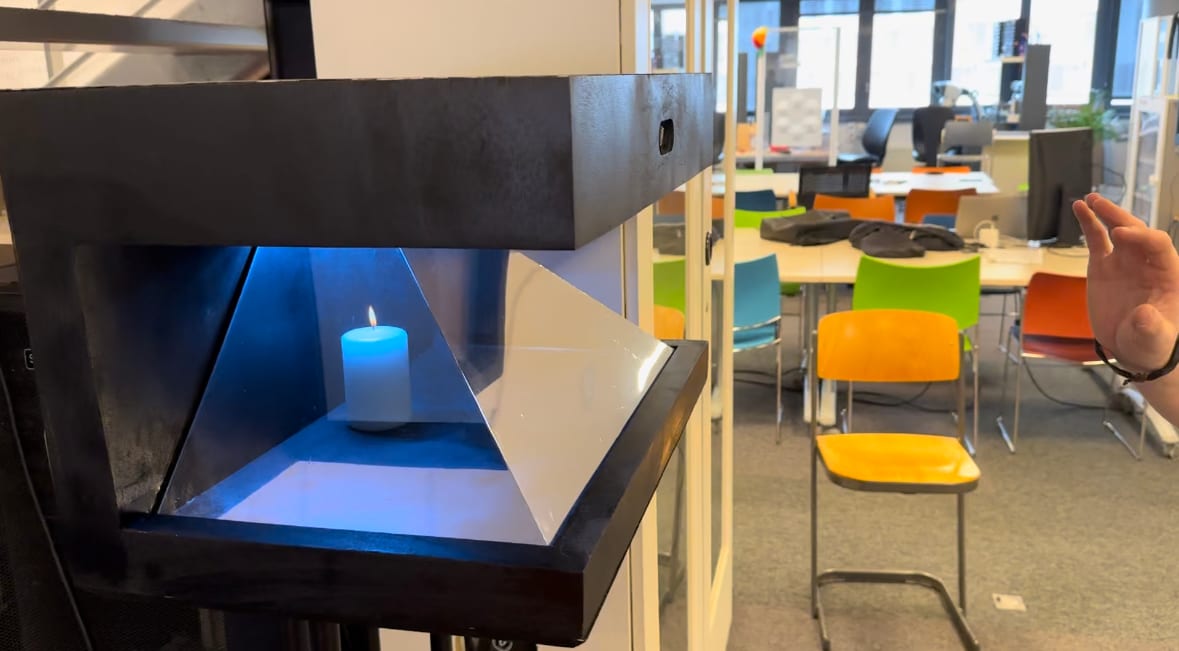
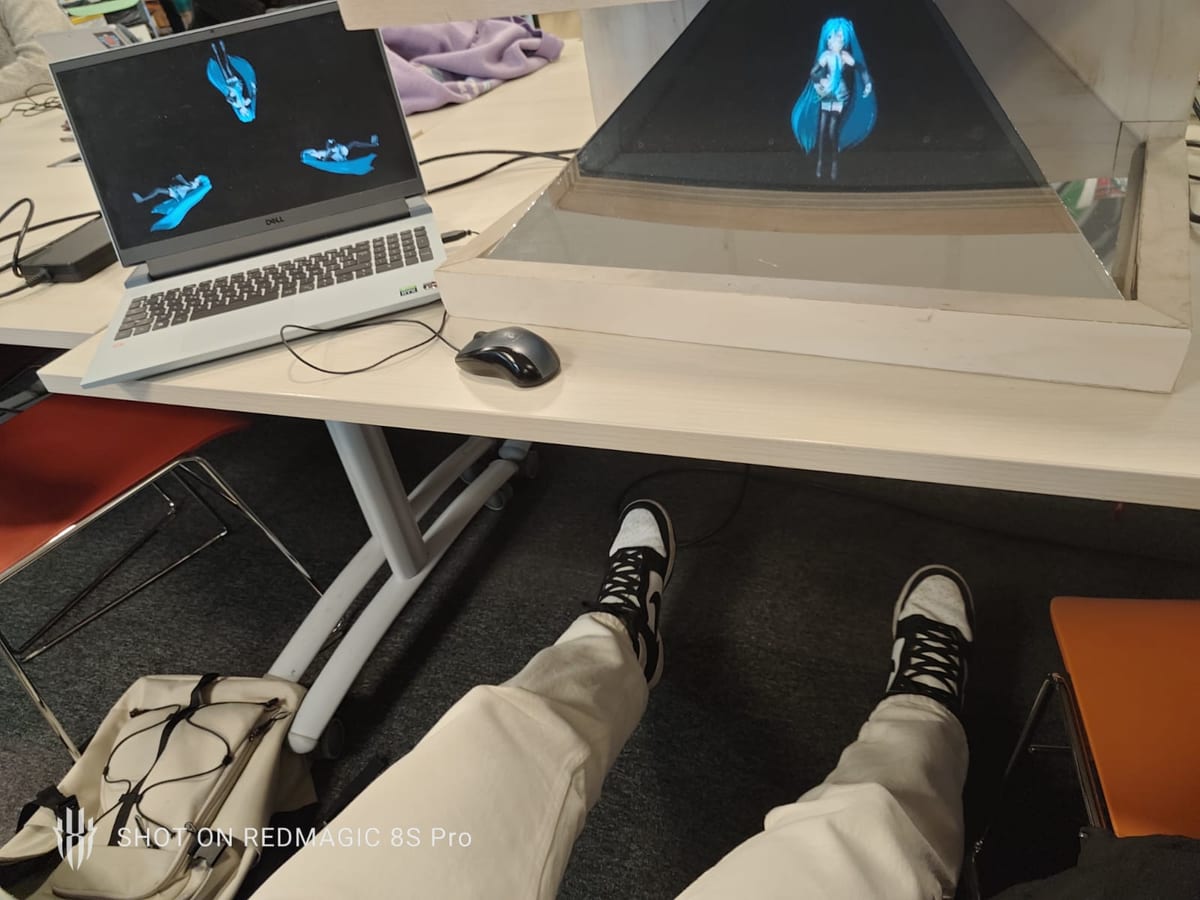
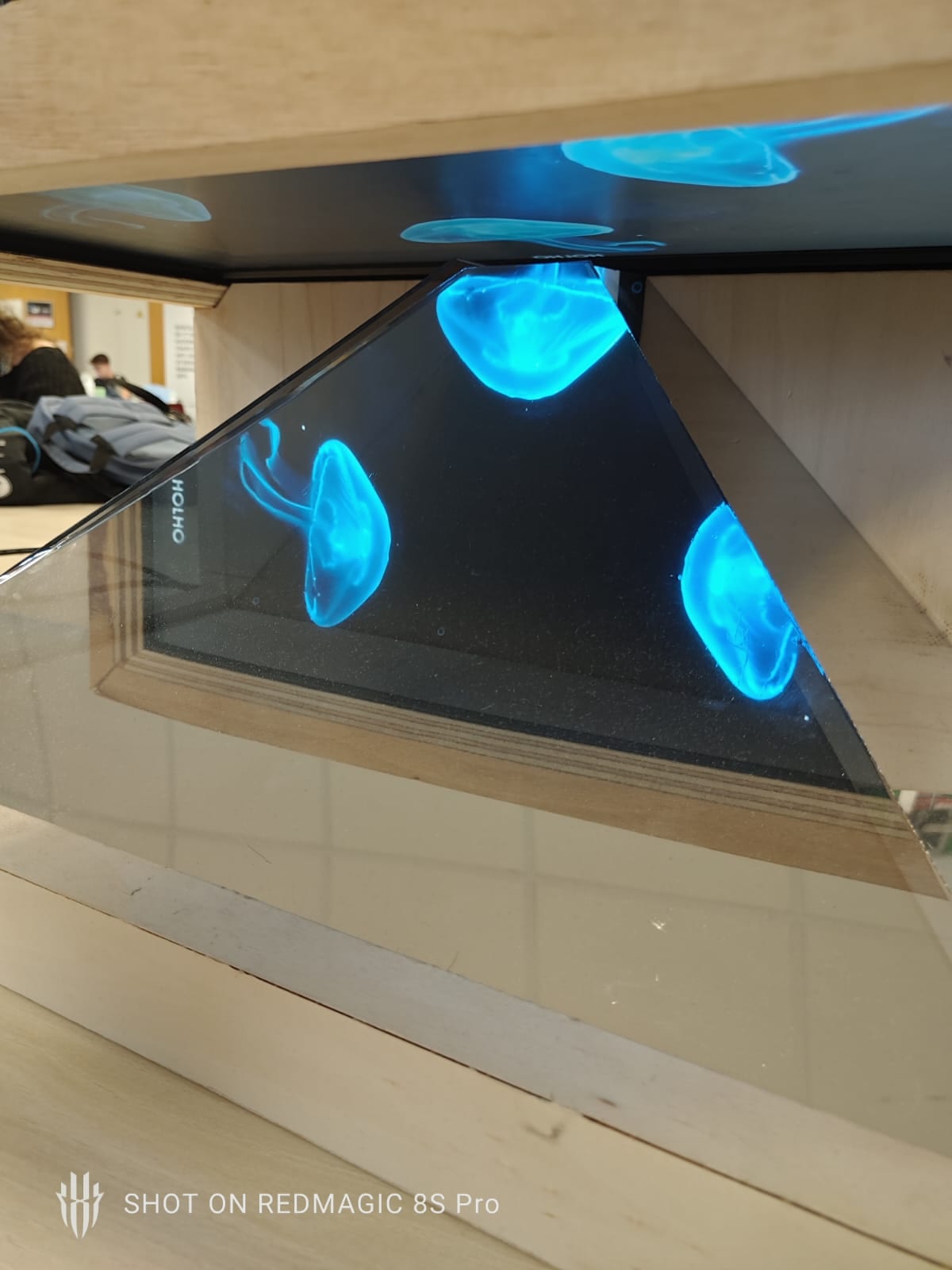
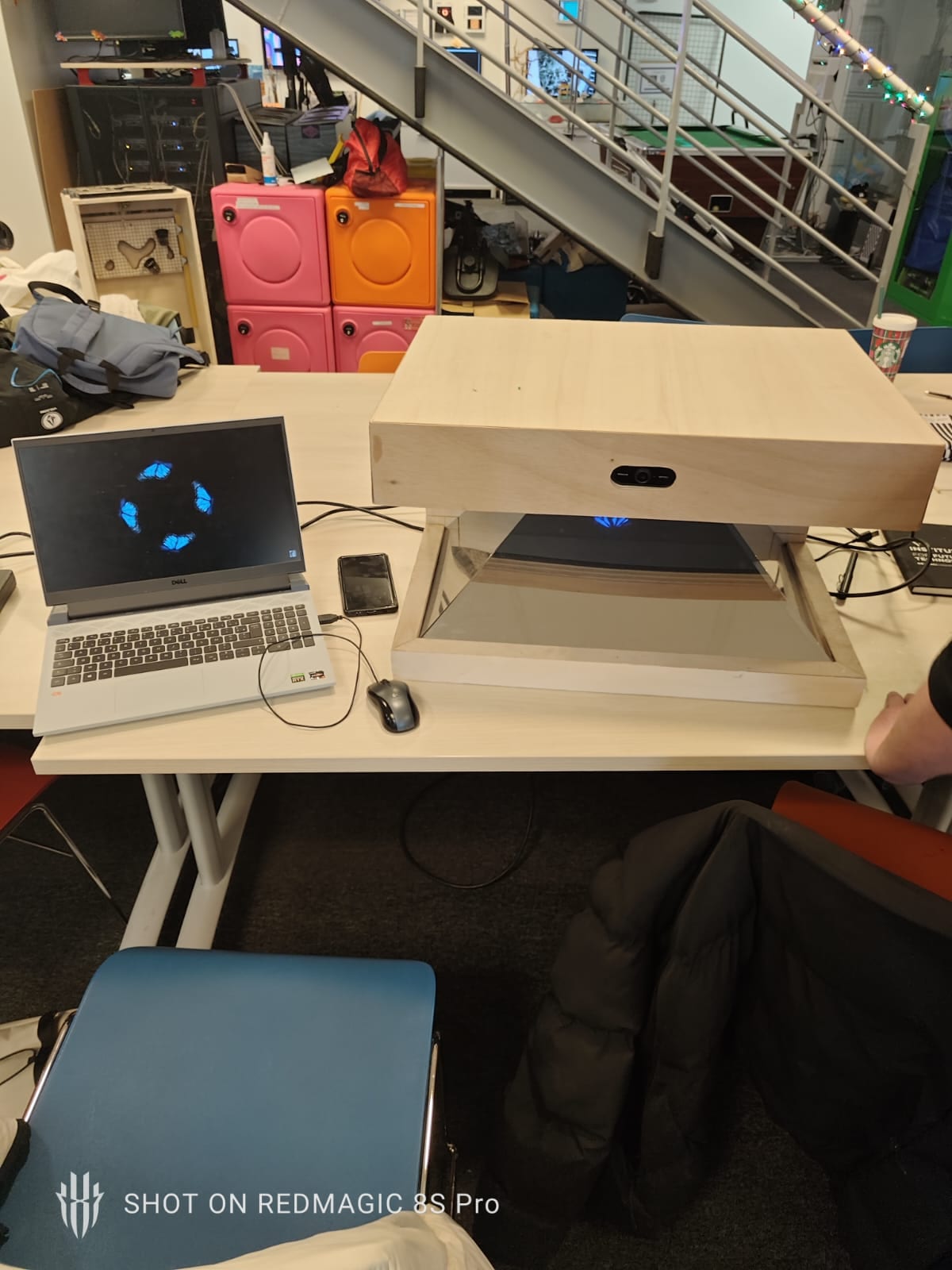
A glass pyramid sits on top of a screen. The screen plays black-backgrounded footage, the four faces reflect it, and your eye assembles the reflections into an object floating in mid-air. The trick is old, it is called Pepper’s ghost, and it has been fooling theatre audiences since 1862.
What makes this one interesting is that you can reach out and change what it shows. A webcam watches your hand. There is no controller, no touchscreen, no remote.
The sleight of hand: Figma is the engine
There is no application. The thing you are interacting with is a Figma prototype, running full screen with the interface chrome switched off.
That is the decision the whole project turns on, and it is a good one. A Figma prototype already gives you states, transitions and clickable hotspots for free, and it can be redesigned in an afternoon by someone who does not write code. So instead of building an app, the team built a prototype and then wrote a small Python program whose only job is to move the real mouse and click on it.
The consequence is that Python and Figma agree on nothing except screen coordinates. When an
audio peak fires, the code does pyautogui.moveTo(90, 990) and clicks — and a button has been
placed at exactly that spot in the Figma file. Move the button, and you have to edit the Python.
It is brittle in the way a stage trick is brittle, and like a stage trick it works.
Your hand becomes the cursor
InteractiveHolo.py opens the webcam with OpenCV, runs each frame through MediaPipe Hands,
and gets back 21 landmarks per hand. Three of them do all the work:
- The little-finger tip drives the cursor. Its normalised position is scaled to the screen and
handed to
pyautogui.moveTo(...). Using the pinky rather than the index is a deliberate choice: the index is busy doing something else. - The thumb tip and the index tip are the click. The code measures the distance between them and fires a click when it drops under a threshold. Pinch to select.
- The wrist anchors the debug overlay, drawn back onto the video feed so you can see what the machine sees while you tune it.
Nothing here is trained or learned. It is geometry, a threshold, and one honest constant to adjust per machine — the README says so plainly, which is the right way to ship a rig that has to work in a room you have never been in.
Blowing on it counts as a click
The part I like most. A second thread opens the webcam’s microphone with PyAudio, computes the RMS of every buffer, converts it to decibels, and if it crosses 78 dB it clicks a fixed point on screen.
In practice that means you blow on the hologram and it reacts. It was used to blow out a candle. A whole input modality obtained from one line of arithmetic on a signal that was already there, because the webcam had a microphone nobody was using.
The hardware
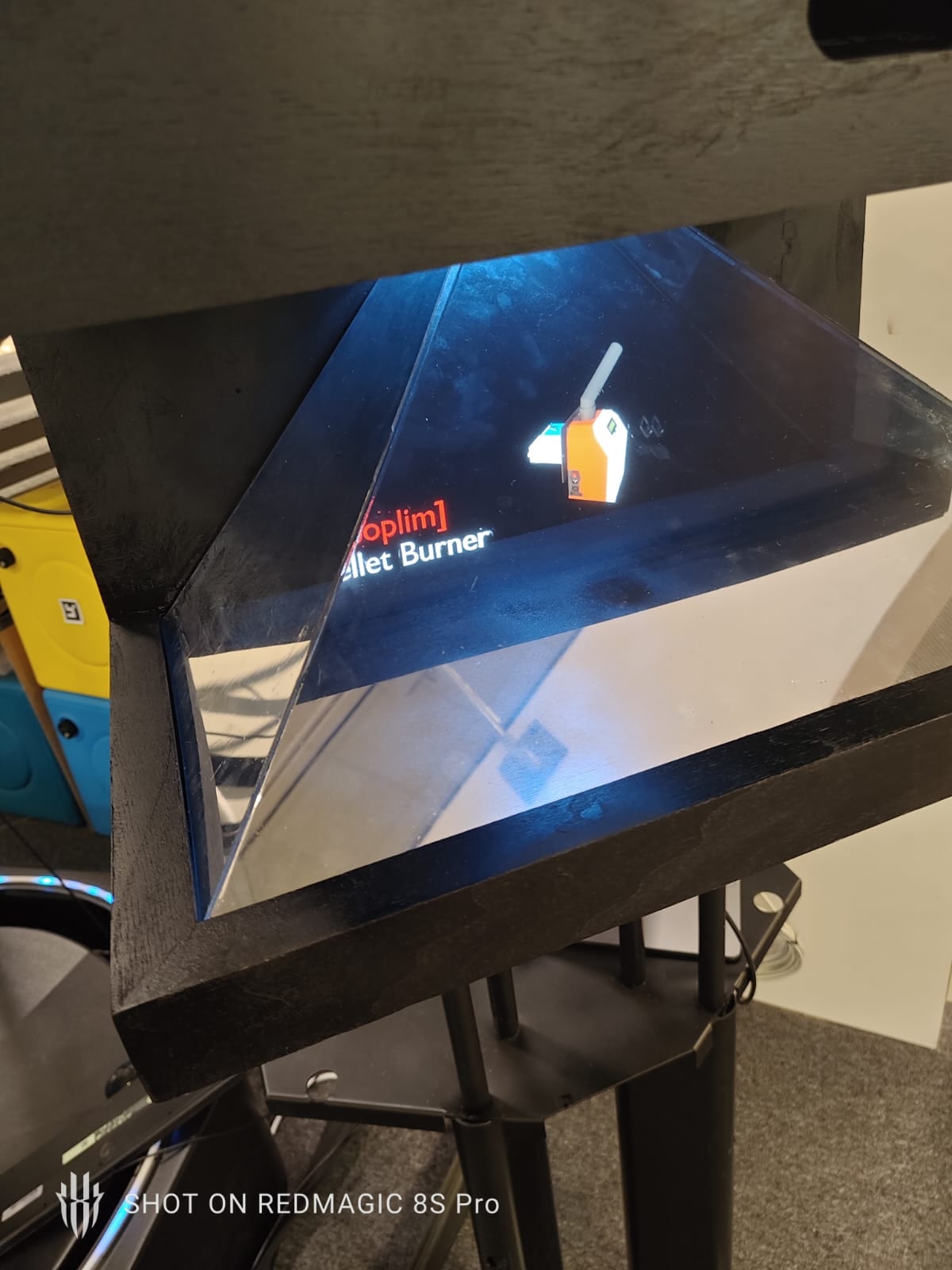
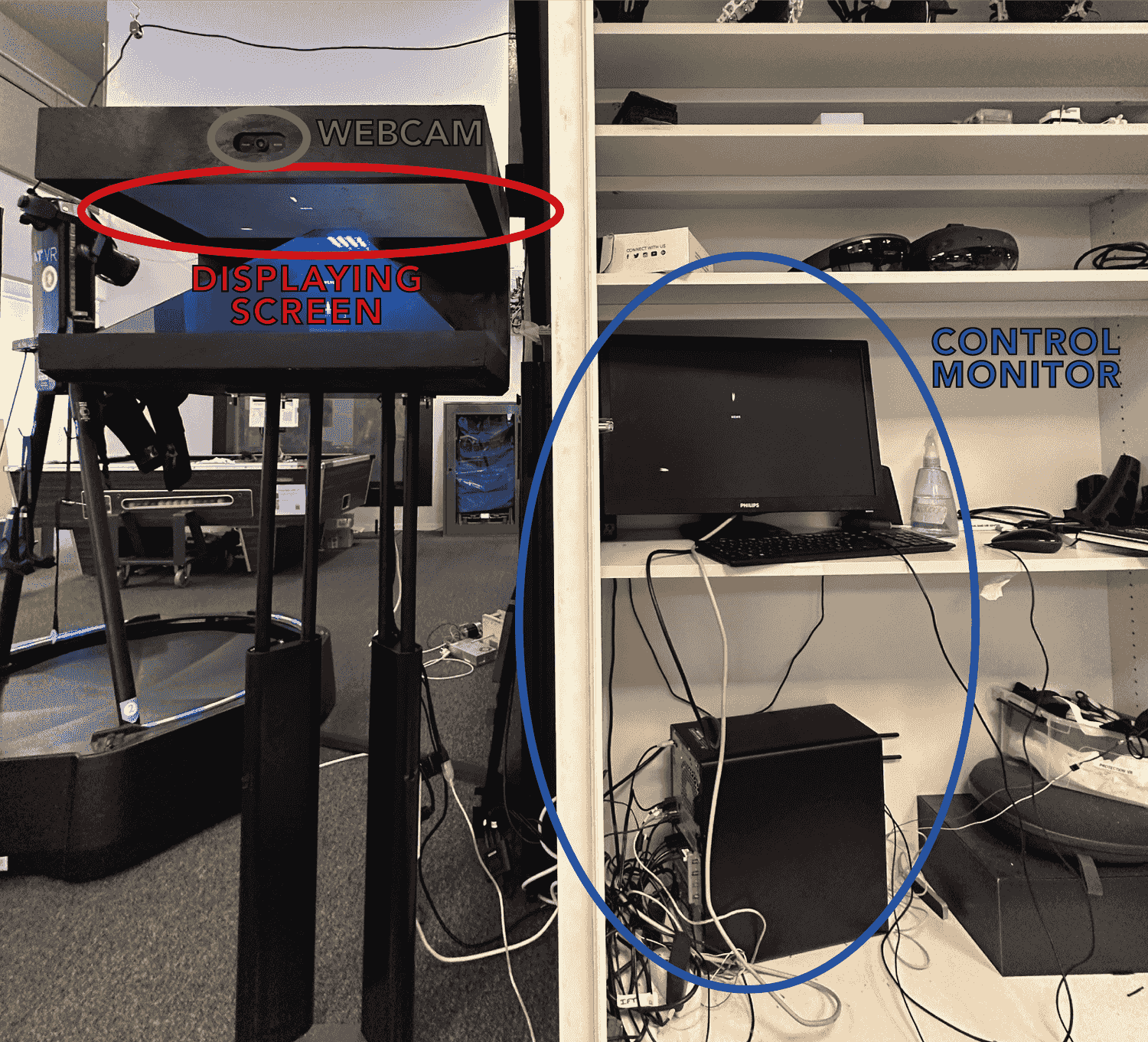
Three pieces, and the README is exact about which is which: a webcam for the hand and the sound, a display screen built into the hologram, and a control monitor where the Python and the Figma actually run. The audience only ever sees the first two.
The object holding all of it up — the wooden frame and the plastic pyramid that does the reflecting — was built by Gaëtan Carrade. It is the part everyone touches and nobody credits: the angles of those four faces are what decides whether the illusion holds.
My part in it
The project is Thomas Bodénan’s. The concept, the electronics and the rig are his, and he is the one who worked out how to make a webcam drive an interface.
What I brought was the other half of the illusion: the motion design and the entire Figma side. Every element you see floating was animated in After Effects, exported on a black background so it would reflect cleanly, and assembled into the prototype with its states and its hotspots. When the Python clicks a coordinate, it is clicking on something I placed.
He also taught me the camera interaction — how to get from a webcam frame to landmarks to a cursor. That was the first time I made a camera drive an interface, and it is a thread I kept pulling: the motion capture in Body Shape Control and the muscle-driven controller in 2D-EMG-GAME both start from the same idea, that a sensor already in the room can become an input if you are willing to do the arithmetic.
Team project, 2024, at the De Vinci Innovation Center. Concept, electronics and code by Thomas Bodénan (repository linked above); wooden structure and pyramid by Gaëtan Carrade; motion design and Figma by me. Technical details on this page are drawn from the README and the source.
Überblick
Eine Glaspyramide steht auf einem Bildschirm. Der Bildschirm spielt Material auf schwarzem Grund, die vier Flächen spiegeln es, und das Auge setzt aus diesen Spiegelungen ein Objekt zusammen, das in der Luft schwebt. Der Trick ist alt, er heißt Pepper’s Ghost und täuscht Theaterpublikum seit 1862.
Interessant an diesem hier ist, dass man die Hand ausstrecken und ändern kann, was er zeigt. Eine Webcam beobachtet die Hand. Kein Controller, kein Touchscreen, keine Fernbedienung.
Der Taschenspielertrick: Figma ist die Engine
Es gibt keine Anwendung. Das, womit man interagiert, ist ein Figma-Prototyp, im Vollbild und mit ausgeblendeter Oberfläche des Werkzeugs.
Auf dieser Entscheidung ruht das ganze Projekt, und sie ist gut. Ein Figma-Prototyp liefert Zustände, Übergänge und klickbare Bereiche schon gratis mit, und er lässt sich an einem Nachmittag von jemandem umbauen, der keinen Code schreibt. Statt eine App zu bauen, hat das Team also einen Prototyp gebaut und dann ein kleines Python-Programm geschrieben, dessen einzige Aufgabe es ist, die echte Maus zu bewegen und darauf zu klicken.
Die Folge: Python und Figma sind sich über nichts einig außer Bildschirmkoordinaten. Bei einem
Audiopeak führt der Code pyautogui.moveTo(90, 990) aus und klickt — und genau dort wurde im
Figma-Dokument ein Button platziert. Verschiebt man den Button, muss man das Python ändern. Das ist
so zerbrechlich wie ein Bühnentrick, und wie ein Bühnentrick funktioniert es.
Die Hand wird zum Cursor
InteractiveHolo.py öffnet die Webcam mit OpenCV, schickt jedes Bild durch MediaPipe Hands
und bekommt 21 Landmarken pro Hand zurück. Drei davon erledigen die ganze Arbeit:
- Die Kleinfingerspitze führt den Cursor. Ihre normalisierte Position wird auf den Bildschirm
skaliert und an
pyautogui.moveTo(...)übergeben. Den kleinen Finger statt des Zeigefingers zu nehmen ist Absicht: der Zeigefinger ist anderweitig beschäftigt. - Daumen- und Zeigefingerspitze bilden den Klick. Der Code misst den Abstand zwischen beiden und löst einen Klick aus, sobald er unter einen Schwellwert fällt. Kneifen heißt auswählen.
- Das Handgelenk verankert die Debug-Anzeige, die zurück auf den Videostrom gezeichnet wird, damit man beim Justieren sieht, was die Maschine sieht.
Nichts davon ist trainiert oder gelernt. Es sind Geometrie, ein Schwellwert und eine ehrliche Konstante, die pro Rechner anzupassen ist — die README sagt das offen, und genau so gehört ein Aufbau ausgeliefert, der in einem Raum funktionieren muss, den man nie betreten hat.
Daraufpusten zählt als Klick
Mein Lieblingsteil. Ein zweiter Thread öffnet das Mikrofon der Webcam mit PyAudio, berechnet den Effektivwert jedes Puffers, rechnet ihn in Dezibel um, und klickt bei Überschreiten von 78 dB einen festen Punkt auf dem Bildschirm.
In der Praxis heißt das: man pustet das Hologramm an, und es reagiert. Damit wurde eine Kerze ausgeblasen. Eine ganze Eingabemodalität, gewonnen aus einer Zeile Arithmetik über ein Signal, das ohnehin da war, weil die Webcam ein Mikrofon hatte, das niemand nutzte.
Die Hardware
Drei Teile, und die README ist präzise darin, welches welches ist: eine Webcam für Hand und Ton, ein Anzeigebildschirm im Hologramm verbaut, und ein Kontrollmonitor, auf dem Python und Figma tatsächlich laufen. Das Publikum sieht immer nur die ersten beiden.
Das Objekt, das alles trägt — der Holzrahmen und die spiegelnde Plastikpyramide — wurde von Gaëtan Carrade gebaut. Es ist das Teil, das alle anfassen und niemand nennt: die Winkel dieser vier Flächen entscheiden darüber, ob die Illusion trägt.
Mein Anteil
Das Projekt gehört Thomas Bodénan. Konzept, Elektronik und Aufbau sind seine, und er hat herausgefunden, wie eine Webcam eine Oberfläche steuern kann.
Was ich beigetragen habe, ist die andere Hälfte der Illusion: das Motion Design und die gesamte Figma-Seite. Jedes schwebende Element wurde in After Effects animiert, auf schwarzem Grund exportiert, damit es sauber spiegelt, und im Prototyp mit seinen Zuständen und Klickbereichen zusammengesetzt. Wenn das Python eine Koordinate anklickt, klickt es auf etwas, das ich platziert habe.
Er hat mir außerdem die Kamerainteraktion beigebracht — wie man von einem Webcam-Bild zu Landmarken und weiter zu einem Cursor kommt. Das war das erste Mal, dass ich eine Kamera eine Oberfläche steuern ließ, und an diesem Faden habe ich weitergezogen: das Motion Capture in Body Shape Control und der muskelgesteuerte Controller in 2D-EMG-GAME gehen beide von derselben Idee aus — dass ein Sensor, der ohnehin im Raum ist, zur Eingabe werden kann, wenn man bereit ist, die Rechnung zu machen.
Teamprojekt, 2024, am De Vinci Innovation Center. Konzept, Elektronik und Code von Thomas Bodénan (Repository oben verlinkt); Holzstruktur und Pyramide von Gaëtan Carrade; Motion Design und Figma von mir. Die technischen Angaben stammen aus der README und dem Quellcode.
Vue d’ensemble
Une pyramide de verre posée sur un écran. L’écran diffuse des images sur fond noir, les quatre faces les réfléchissent, et l’œil recompose ces reflets en un objet qui flotte en l’air. Le truc est ancien, il s’appelle le fantôme de Pepper, et il trompe les salles de théâtre depuis 1862.
Ce qui rend celui-ci intéressant, c’est qu’on peut tendre la main et changer ce qu’il montre. Une webcam regarde la main. Pas de manette, pas d’écran tactile, pas de télécommande.
Le tour de passe-passe : Figma sert de moteur
Il n’y a pas d’application. Ce avec quoi on interagit est un prototype Figma, lancé en plein écran, habillage de l’outil masqué.
C’est la décision sur laquelle tout le projet repose, et elle est bonne. Un prototype Figma offre déjà gratuitement des états, des transitions et des zones cliquables, et il se refait en une après-midi par quelqu’un qui n’écrit pas de code. Plutôt que de construire une application, l’équipe a donc construit un prototype, puis écrit un petit programme Python dont le seul rôle est de déplacer la vraie souris et de cliquer dessus.
Conséquence : Python et Figma ne s’accordent sur rien d’autre que des coordonnées écran. Quand
un pic sonore se déclenche, le code fait pyautogui.moveTo(90, 990) et clique — et un bouton a été
placé exactement à cet endroit dans le fichier Figma. Déplacez le bouton, il faut modifier le
Python. C’est fragile comme un tour de scène, et comme un tour de scène, ça marche.
La main devient le curseur
InteractiveHolo.py ouvre la webcam avec OpenCV, passe chaque image dans MediaPipe Hands
et récupère 21 points par main. Trois d’entre eux font tout le travail :
- Le bout de l’auriculaire pilote le curseur. Sa position normalisée est mise à l’échelle de
l’écran et passée à
pyautogui.moveTo(...). Utiliser l’auriculaire plutôt que l’index est un choix délibéré : l’index est occupé ailleurs. - Le bout du pouce et celui de l’index font le clic. Le code mesure la distance entre les deux et déclenche un clic quand elle passe sous un seuil. On pince pour sélectionner.
- Le poignet ancre l’affichage de débogage, redessiné sur le flux vidéo pour voir ce que la machine voit pendant qu’on règle.
Rien ici n’est entraîné ni appris. C’est de la géométrie, un seuil, et une constante honnête à ajuster par machine — le README le dit franchement, et c’est la bonne façon de livrer un dispositif qui devra fonctionner dans une salle où l’on n’a jamais mis les pieds.
Souffler dessus vaut un clic
La partie que je préfère. Un second fil d’exécution ouvre le micro de la webcam avec PyAudio, calcule la valeur efficace de chaque tampon, la convertit en décibels, et si elle dépasse 78 dB, clique un point fixe de l’écran.
En pratique, cela veut dire qu’on souffle sur l’hologramme et il réagit. Ça servait à souffler une bougie. Toute une modalité d’entrée obtenue avec une ligne d’arithmétique sur un signal qui était déjà là, parce que la webcam avait un micro dont personne ne se servait.
Le matériel
Trois éléments, et le README est précis sur le rôle de chacun : une webcam pour la main et le son, un écran d’affichage intégré à l’hologramme, et un moniteur de contrôle où tournent réellement le Python et le Figma. Le public ne voit jamais que les deux premiers.
L’objet qui porte tout ça — la structure en bois et la pyramide en plastique qui fait la réflexion — a été réalisé par Gaëtan Carrade. C’est la pièce que tout le monde touche et que personne ne crédite : ce sont les angles de ces quatre faces qui décident si l’illusion tient.
Ma part
Le projet est celui de Thomas Bodénan. Le concept, l’électronique et le dispositif sont à lui, et c’est lui qui a trouvé comment faire piloter une interface par une webcam.
Ce que j’ai apporté, c’est l’autre moitié de l’illusion : le motion design et toute la partie Figma. Chaque élément qu’on voit flotter a été animé sous After Effects, exporté sur fond noir pour se refléter proprement, puis assemblé dans le prototype avec ses états et ses zones cliquables. Quand le Python clique une coordonnée, il clique sur quelque chose que j’ai placé.
Il m’a aussi appris l’interaction par caméra — comment passer d’une image de webcam à des points, puis à un curseur. C’était la première fois que je faisais piloter une interface par une caméra, et c’est un fil que je n’ai plus lâché : la capture de mouvement de Body Shape Control et le contrôleur musculaire de 2D-EMG-GAME partent tous deux de la même idée, qu’un capteur déjà présent dans la pièce peut devenir une entrée si on accepte de faire le calcul.
Projet d’équipe, 2024, au De Vinci Innovation Center. Concept, électronique et code par Thomas Bodénan (dépôt lié ci-dessus) ; structure bois et pyramide par Gaëtan Carrade ; motion design et Figma par moi. Les détails techniques proviennent du README et du code.
概要
ガラスのピラミッドがディスプレイの上に置かれています。画面は黒背景の映像を流し、四つの面がそれを反射し、見る人の目がその反射を組み立てて、宙に浮かぶ物体として認識します。仕掛け自体は古く、ペッパーズ・ゴーストと呼ばれ、1862 年から劇場の観客を欺いてきました。
このプロジェクトが面白いのは、手を伸ばして、映っているものを変えられる点です。ウェブカメラが手を見ています。コントローラーもタッチパネルもリモコンもありません。
種明かし:エンジンは Figma
アプリケーションは存在しません。操作している対象は Figma のプロトタイプで、ツールの UI を消して全画面で走らせています。
プロジェクト全体がこの判断の上に成り立っていて、それは良い判断です。Figma のプロトタイプは、状態も遷移もクリック領域も最初から備えていますし、コードを書かない人でも一日で作り替えられます。アプリを作る代わりに、チームはプロトタイプを作り、本物のマウスを動かしてそれをクリックするだけの小さな Python プログラムを書きました。
その結果、Python と Figma が共有しているのは画面座標だけです。音のピークが立つと、コードは pyautogui.moveTo(90, 990) を実行してクリックし、Figma 側にはちょうどその位置にボタンが置いてあります。ボタンを動かせば Python も直す必要があります。舞台の仕掛けのように脆く、そして舞台の仕掛けと同じように、ちゃんと機能します。
手がカーソルになる
InteractiveHolo.py は OpenCV でウェブカメラを開き、各フレームを MediaPipe Hands に通して、手ごとに 21 個のランドマークを受け取ります。実際に働くのはそのうち三つです。
- 小指の先がカーソルを動かします。正規化された座標を画面サイズに合わせ、
pyautogui.moveTo(...)に渡します。人差し指ではなく小指を使うのは意図的で、人差し指は別の役割で塞がっているためです。 - 親指と人差し指の先がクリックです。両者の距離を測り、しきい値を下回った時点でクリックを発火します。つまんで選ぶ、という操作です。
- 手首がデバッグ表示の基点になります。映像に重ねて描き直すことで、調整中に機械が見ているものを確認できます。
学習も訓練も一切ありません。幾何としきい値、そして機械ごとに調整すべき正直な定数が一つあるだけです。README がそれを率直に書いているのは正しい姿勢で、一度も足を踏み入れたことのない部屋で動かさなければならない装置は、こう届けるべきです。
息を吹きかけるとクリックになる
個人的に一番好きな部分です。別スレッドが PyAudio でウェブカメラのマイクを開き、バッファごとに実効値を求めてデシベルに換算し、78 dB を超えたら画面上の決まった一点をクリックします。
つまり実際には、ホログラムに息を吹きかけると反応するということです。蝋燭を吹き消すのに使っていました。すでにそこにあった信号への一行の計算だけで、入力手段がまるごと一つ生まれたわけです。ウェブカメラには、誰も使っていないマイクが付いていたからです。
ハードウェア
構成は三つで、README はどれがどれかを正確に書いています。手と音のためのウェブカメラ、ホログラムに組み込まれた表示用ディスプレイ、そして Python と Figma が実際に走る制御用モニターです。観客の目に入るのは、常に最初の二つだけです。
それらすべてを支える物体、つまり木製の構造体と反射を担うプラスチックのピラミッドは、Gaëtan Carrade が製作しました。誰もが触れるのに誰も名前を挙げない部分です。この四面の角度こそが、錯覚が成立するかどうかを決めています。
私が担当した部分
このプロジェクトは Thomas Bodénan のものです。構想も電子回路も装置も彼のもので、ウェブカメラでインターフェースを操作する方法を考えたのも彼です。
私が持ち込んだのは、この錯覚のもう半分、モーションデザインと Figma 側のすべてでした。浮かんで見える要素はすべて After Effects でアニメーションを付け、きれいに反射するよう黒背景で書き出し、状態とクリック領域を備えたプロトタイプに組み上げています。Python が座標をクリックするとき、それは私が置いたものをクリックしています。
彼はカメラによるインタラクションも教えてくれました。ウェブカメラの一枚の画像からランドマークへ、そしてカーソルへ、という道筋です。カメラでインターフェースを動かしたのはそれが初めてで、以来ずっと手繰り続けている糸でもあります。Body Shape Control のモーションキャプチャも、2D-EMG-GAME の筋電コントローラーも、出発点は同じ考え方です。すでに部屋にあるセンサーは、計算を厭わなければ入力になる、ということです。
2024 年、De Vinci Innovation Center でのチームプロジェクト。構想・電子回路・コードは Thomas Bodénan(リポジトリは上部のリンク)、木製構造とピラミッドは Gaëtan Carrade、モーションデザインと Figma は私が担当しました。技術的な記述は README とソースコードに基づいています。
概览
一座玻璃金字塔立在屏幕上。屏幕播放黑底素材,四个面把它反射出来,眼睛再把这些反射拼成一个悬浮在空中的物体。这个把戏很老,叫佩珀尔幻象,从 1862 年起就一直在骗剧场里的观众。
它有意思的地方在于,你可以伸手去改变它显示的内容。一台摄像头在看你的手。没有手柄,没有触摸屏,没有遥控器。
机关:引擎其实是 Figma
这里没有应用程序。你在操作的是一个 Figma 原型,全屏运行,工具本身的界面已经关掉。
整个项目都建立在这个决定之上,而这个决定是对的。Figma 原型本来就自带状态、转场和可点击热区,而且一个不写代码的人一个下午就能重做一遍。所以团队没有做应用,而是做了一个原型,再写一个小小的 Python 程序,它唯一的工作就是移动真实的鼠标并在上面点击。
结果是,Python 和 Figma 之间唯一的共识只有屏幕坐标。当声音峰值触发时,代码执行 pyautogui.moveTo(90, 990) 并点击——而 Figma 文件里恰好在那个位置放了一个按钮。挪动按钮,就得改 Python。它像舞台机关一样脆弱,也像舞台机关一样,确实能用。
手变成光标
InteractiveHolo.py 用 OpenCV 打开摄像头,把每一帧送进 MediaPipe Hands,取回每只手的 21 个关键点。真正干活的只有三个:
- 小指指尖驱动光标。它的归一化坐标被缩放到屏幕尺寸,再交给
pyautogui.moveTo(...)。用小指而不是食指是有意为之:食指另有任务。 - 拇指和食指指尖构成点击。代码测量两者距离,低于阈值时触发点击。捏一下即选中。
- 手腕锚定调试图层,重绘回视频流上,让你在调参时看到机器看到的东西。
这里没有任何训练或学习成分。只有几何、一个阈值,以及一个需要按机器调整的、诚实的常数——README 直说了这一点,而对一套必须在你从未去过的房间里运行的装置来说,这才是正确的交付方式。
对着它吹气也算点击
我最喜欢的部分。另一个线程用 PyAudio 打开摄像头的麦克风,计算每个缓冲区的均方根值,换算成分贝,一旦超过 78 dB,就点击屏幕上一个固定的点。
实际效果就是:你对着全息影像吹气,它会有反应。当时用来吹灭一支蜡烛。一整套输入方式,只来自对一个本就存在的信号做的一行运算——因为摄像头上有一个没人用的麦克风。
硬件
三个部件,README 对各自的角色写得很清楚:负责手部与声音的摄像头、嵌在全息装置里的显示屏,以及真正运行 Python 和 Figma 的控制显示器。观众看到的永远只有前两个。
承载这一切的实体——木质结构与负责反射的塑料金字塔——由 Gaëtan Carrade 制作。这是所有人都会触碰、却没人署名的部分:正是这四个面的角度,决定了幻觉能否成立。
我负责的部分
这个项目属于 Thomas Bodénan。概念、电子部分和装置都是他的,想出如何让摄像头驱动界面的人也是他。
我带来的是这场幻觉的另一半:动效设计和整个 Figma 部分。所有悬浮的元素都在 After Effects 里做了动画,按黑底导出以便干净地反射,再连同状态和热区一起组装进原型。当 Python 点击某个坐标时,它点到的是我放置的东西。
他还教了我摄像头交互——如何从一帧画面到关键点,再到光标。那是我第一次让摄像头驱动一个界面,也是我此后一直没放下的线索:Body Shape Control 的动作捕捉,和 2D-EMG-GAME 的肌电控制器,出发点是同一个想法——只要肯做那点计算,房间里已有的传感器就能变成输入。
2024 年,De Vinci 创新中心的团队项目。概念、电子与代码由 Thomas Bodénan 完成(仓库见上方链接);木质结构与金字塔由 Gaëtan Carrade 制作;动效设计与 Figma 由我负责。技术细节来自 README 与源码。